April 2, 2026 · DealerScout.ai Team
How DealerScout.ai Works: AI Dealer Detection Explained
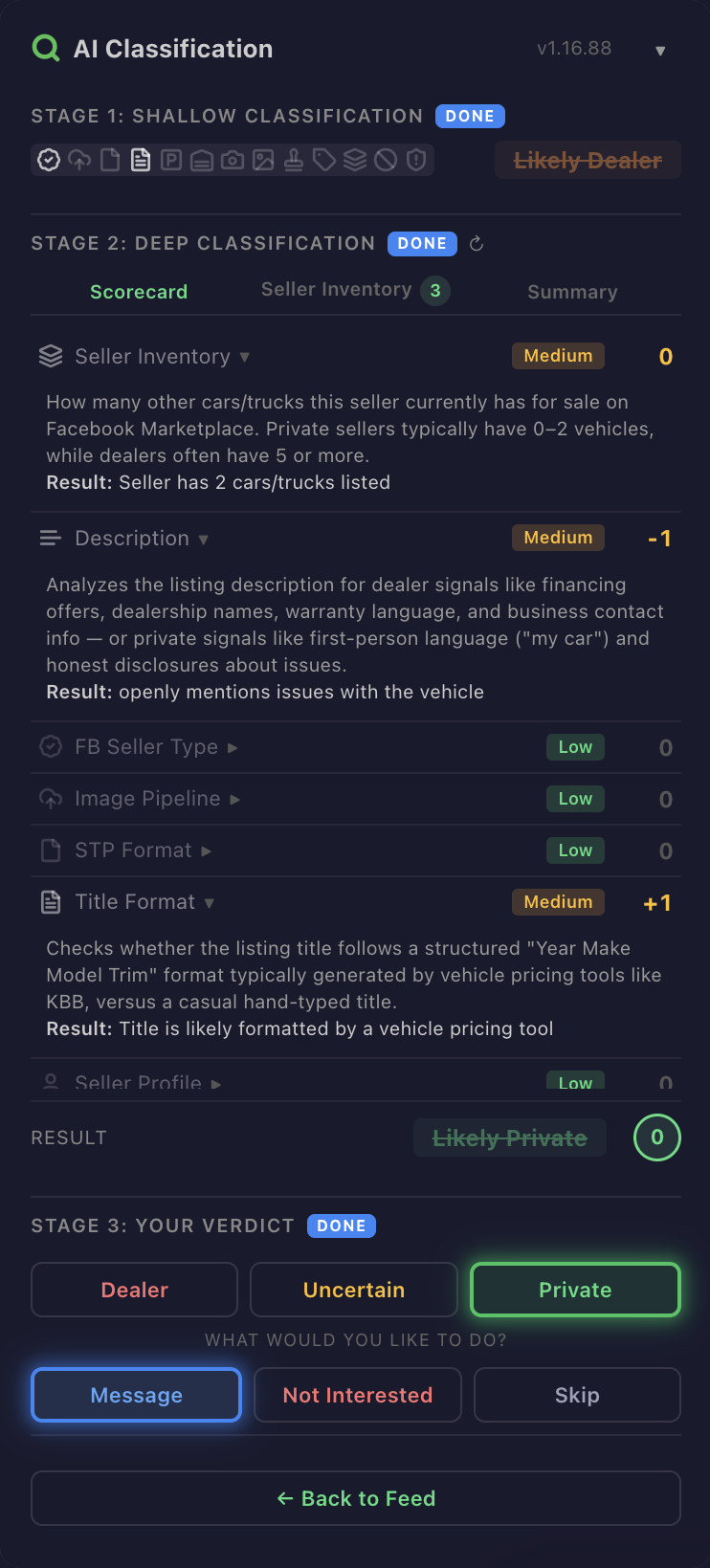
DealerScout.ai is a Chrome extension that classifies every vehicle listing on Facebook Marketplace as Private, Dealer, or Uncertain — in real time, as you browse. This article explains how the detection system works, what signals it analyzes, and why AI-powered classification is more reliable than manual checking.
The Two-Stage Classification System
When you browse a vehicle feed on Facebook Marketplace, DealerScout.ai runs a two-stage analysis on every listing.
Stage 1: Shallow Classification happens instantly as listings load. The extension reads data that Facebook makes available on the feed page — the listing title, price, seller type metadata, and thumbnail image. From this data alone, 13 signals are evaluated and the listing receives an initial verdict.
Stage 2: Deep Classification runs when you click into a specific listing (the product detail page). The extension extracts richer data: the seller's full inventory, their profile information, the listing description, and higher-resolution images. This data feeds into a detailed scorecard that refines the initial classification.
The two-stage approach means you get instant results while scrolling — no waiting for API calls on every listing — with deeper analysis available on demand.
The 13 Signals
Every classification is built on 13 distinct signals. Each one contributes to the overall dealer probability score. Here's what they measure:
Seller signals:
- Seller inventory count — How many other listings does this seller have? Multiple active vehicle listings is the single strongest dealer indicator.
- Seller description — Does the seller's profile description mention dealership names, business hours, financing, or warranty terms?
- Facebook seller type — Facebook internally categorizes some sellers as commercial. This metadata isn't always visible in the UI, but the extension can detect it.
- Seller profile analysis — Ratio of vehicle listings to other activity, account age, and profile completeness.
Visual signals (powered by image analysis):
- Professional photography — Consistent lighting, studio backgrounds, and professional angles indicate commercial photo setups.
- Stock photos — Images pulled from manufacturer galleries or auction sites rather than taken by the seller.
- Watermarks — Dealer logos, website URLs, or auction house marks overlaid on images.
- Dealer lot background — Paved lots, inventory rows, showroom interiors, and commercial buildings in the background.
- Multiple vehicles in frame — Other cars visible behind the listed vehicle suggests a lot, not a driveway.
- No license plates — Dealers frequently remove or obscure plates before photographing. Private sellers usually don't bother.
- Showroom indicators — Indoor environments, fluorescent lighting, and display pedestals.
- Windshield stickers — Price stickers, dealer decals, and key tags visible in photos.
Listing signals:
- Title and price format — Pricing patterns like $XX,999 and marketing-style titles with feature bullet points correlate with commercial listings.
Each signal is shown as an icon on the listing card's signal dock. Hit signals (present) appear bright; clear signals (absent) appear dimmed. At a glance, you can see exactly which signals fired for any listing.
The Scoring Scorecard
When you open a listing's detail page, the extension's panel shows a 7-row scorecard. Each row represents a scoring dimension:
- Seller Inventory — Based on the seller's total listing count. High count = strong dealer signal.
- Seller Description — Analyzes the seller's profile text for commercial language.
- Facebook Seller Type — Whether Facebook's own metadata flags the seller as commercial.
- Image Pipeline — Results from the visual signal analysis (photos, backgrounds, watermarks).
- Standard Price Format — Whether the pricing follows dealer conventions.
- Title Format — Whether the listing title uses marketing-style formatting.
- Seller Profile — Overall profile analysis combining multiple data points.
Each row shows a confidence level (high, medium, or low) and a score. High-confidence rows auto-expand to show their reasoning. Low-confidence rows collapse to reduce noise.
The final verdict — Private, Dealer, or Uncertain — is computed from the weighted sum of all rows. The score is displayed in a colored circle: green for Private, red for Dealer, yellow for Uncertain.
The AI Models
DealerScout.ai uses two AI models working together:
Text classification handles listing titles, descriptions, seller profiles, and pricing patterns. The model evaluates whether the language patterns match private seller or commercial dealer conventions.
Image classification analyzes listing photos for visual dealer signals: professional photography, lot backgrounds, stock photos, watermarks, and more. When Image Classification is enabled (the default), thumbnail images are sent alongside text data for a multimodal analysis.
Both models run through the DealerScout.ai API — not on your device. The extension sends listing data to the API, which processes it and returns the classification. This keeps the extension lightweight and ensures the models can be updated without requiring extension updates.
What You Can Override
AI is powerful but not infallible. DealerScout.ai gives you full control:
Verdict override. If you disagree with the AI's classification, click Private, Dealer, or Uncertain on the PDP panel. Your override is saved and the listing's badge updates immediately.
Not Interested. Mark any listing to frost it on your feed — useful for listings you've already seen or aren't interested in regardless of seller type.
Signal transparency. Every signal is visible. You can see exactly why the AI classified a listing the way it did and make your own judgment. Nothing is a black box.
Privacy by Design
A fair question: what data does DealerScout.ai see?
The extension only runs on Facebook Marketplace pages. It reads listing data (titles, prices, photos, seller info) that's already visible on the page you're browsing. It does not access your Facebook messages, profile, friends list, or any personal data.
Listing data is sent to the DealerScout.ai API for classification and is not stored permanently. Your verdict overrides and preferences are associated with your account but not shared with anyone.
The Result
The combination of 13 signals, two-stage classification, and multimodal AI means DealerScout.ai can evaluate a listing in seconds — something that would take a human buyer several minutes of manual investigation per listing.
On a typical vehicle feed with 20-30 listings visible, that's the difference between 30 seconds of automated scanning and an hour of clicking through seller profiles. Multiply that across every browsing session, and the time savings add up to hours of manual work eliminated.
The goal isn't to replace your judgment — it's to give you the information you need to make faster, more informed decisions about which listings deserve your time.